The independent judgment layer for production changes

Know whether a change should ship.

AI agents and humans are making production changes faster than anyone can safely evaluate them. Before a change ships, ChangeGuard AI judges it against the environment it will actually enter — SHIP, HOLD or BLOCK, with the reasons in plain terms. After it deploys, ChangeGuard AI observes what happened and keeps the record.

AI can make the change. ChangeGuard AI decides whether it should.

Advisory by default · read-only by default · works with the delivery workflow you already have.

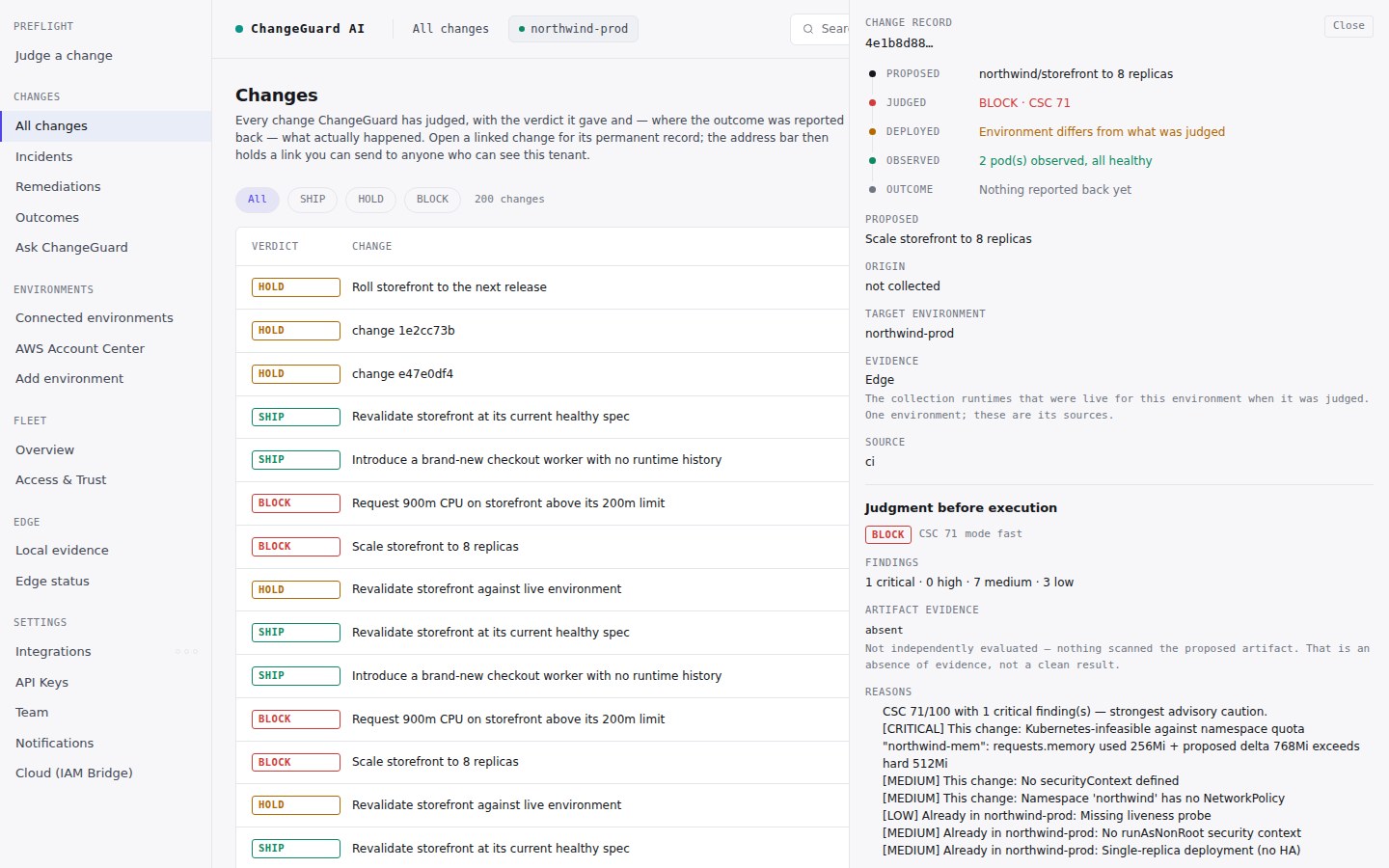
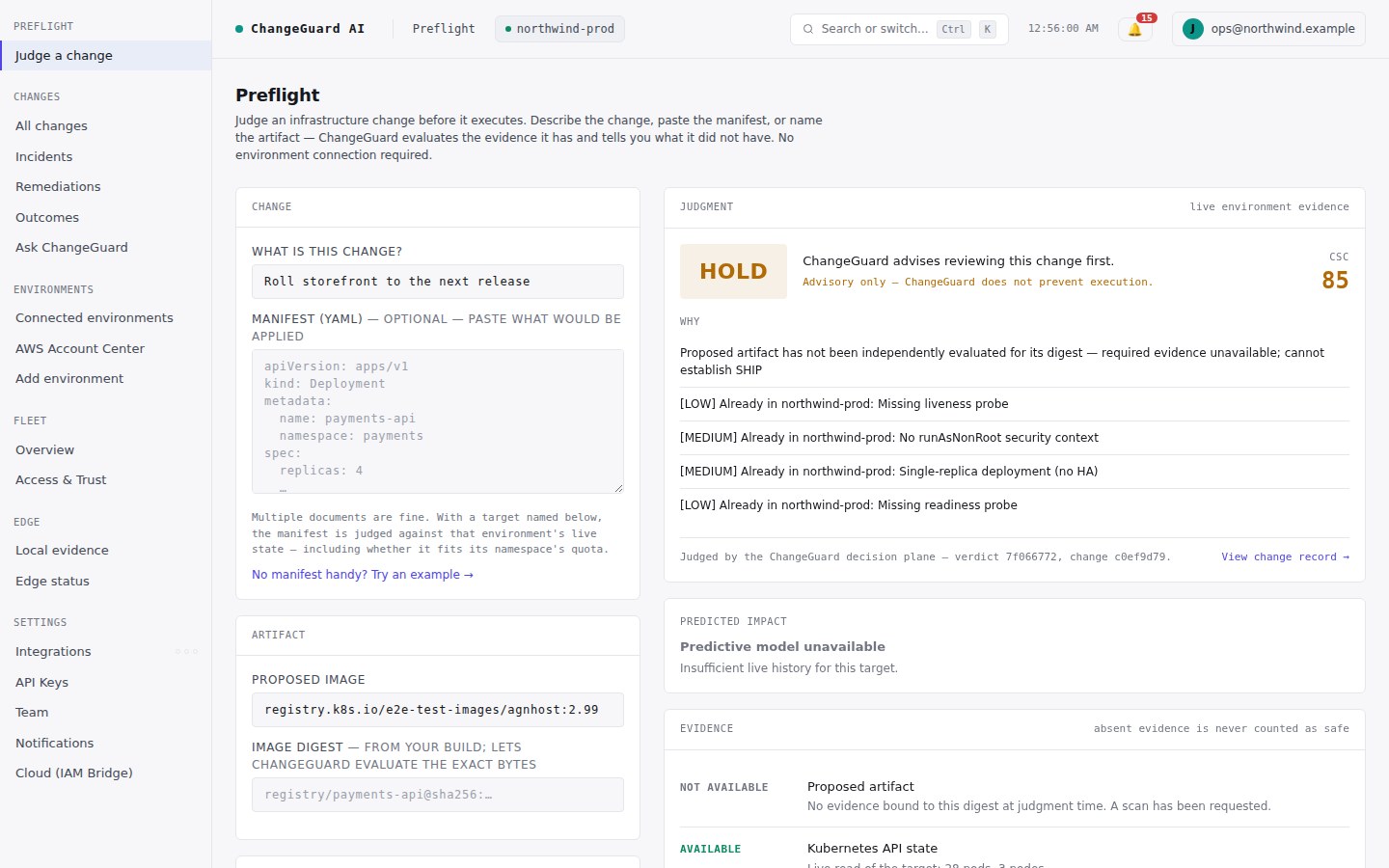
app.changeguard.ai — Preflight · a real verdict
ChangeGuard AI Preflight: a proposed change to roll the storefront to a new release, judged against the northwind-prod environment. Verdict HOLD, with plain-English reasons and an evidence panel showing live environment state available and the proposed artifact not yet evaluated.
Real product output. The verdict says what evidence it had — and what it didn’t. Missing evidence is never counted as safe.
The problem

Production changes now come from humans and AI agents — and every one of them arrives with a green build.

A build passing tells you the code compiled and the tests ran. It says nothing about the environment the change is about to land in: what is running there right now, what it can afford, what broke last time. That question — should this ship, here, now? — has had no owner. It has been a person’s judgment, and people are no longer in the loop for every change.

A green build is not a safe change

Valid YAML, passing tests, and a change that would exceed the environment’s memory budget the moment it lands. Only a judgment against live state catches it.

Nobody closes the loop

The deploy succeeds, the incident starts twenty minutes later, and the connection between them is reconstructed by hand — if anyone has time.

Agents don’t ask

A coding agent shipping on its own gets no review at all. What it needs is something to ask — an independent check that answers in seconds and remembers what happened.

How it works

Proposed change → environment → verdict → outcome

One judgment, before and after. The same record carries what was proposed, what ChangeGuard AI decided, what actually happened, and what was done about it.

1 · Proposed change

A change is about to go to production

From a pull request, a pipeline, an agent, or a person typing it in. Describe it or hand over the actual manifest.

2 · Environment

The place it will actually land

ChangeGuard AI reads the live state of the target environment — what is running, what it can afford, what it looks like right now.

3 · Judgment

SHIP / HOLD / BLOCK

A verdict with the reasons in plain terms, and an honest list of the evidence it had and the evidence it didn’t. Absent evidence is never counted as safe.

4 · Deployment & outcome

What actually happened

If the change ships, ChangeGuard AI observes the result — deployed successfully, or an incident — and writes it into the same record.

5 · Remediation & history

Fixed, verified, remembered

When something goes wrong, a fix is proposed, approved (or automated within your policy), applied and verified. The record is permanent.

Watch it decide

A change is about to go to production — in under two minutes

Recorded live against a real environment. A change judged by hand, a change from the pipeline that gets blocked, a change that ships and succeeds, one that ships and fails, the fix, and the record. Nothing staged, nothing mocked.

ChangeGuard AI — the demo · 1:42
Recorded in the ChangeGuard AI acceptance environment against a live target. Narrated, captioned; the transcript is below.
Read the transcript

This is Northwind’s production environment. ChangeGuard is watching it live, read-only. Any change headed here gets judged first.

Someone proposes a change: roll the storefront to a new release. Before it goes anywhere, they ask ChangeGuard.

ChangeGuard checks the change against the environment it will actually enter. The verdict is HOLD: the new release hasn’t been independently evaluated yet, and ChangeGuard says exactly what evidence it had and what it didn’t. Missing evidence is never treated as safe.

Now a change arrives from the delivery pipeline: scale the storefront to eight replicas. Judged against what’s actually running, it would exceed the environment’s memory budget. BLOCK, with the reason in plain terms. It never reaches production.

A safe change gets SHIP. And ChangeGuard doesn’t stop at the verdict.

After a change deploys, ChangeGuard observes what actually happened and writes it into the same record. This one shipped from a pull request and succeeded.

This one shipped too, but the deploy failed. The incident is recorded against the exact change that caused it, not lost in a log somewhere.

When something goes wrong, ChangeGuard proposes the fix. In Advise mode a person approves it, or rejects it, before anything is applied. Then it’s applied and verified, and every fix keeps its approver on record.

Every change keeps a permanent record: what was proposed, what ChangeGuard decided, what happened, and what was done about it. That’s ChangeGuard.

The real product

Four screens, one change lifecycle

Every frame below is the product against a live environment. Every verdict shown was earned by real evidence.

1

Judge a change — by hand, in seconds

Describe the change, name the environment, evaluate. The verdict comes with its reasons and with the evidence it had and did not have. No setup, no environment required to start.

Preflight — a proposed change, judged
Preflight showing a HOLD verdict for a proposed storefront release, with reasons and an evidence panel.
2

A change the environment can’t afford — BLOCK

From a real pull request: scale the storefront to eight replicas. The manifest is valid. Against what is actually running, it would exceed the namespace’s memory budget — and the record says so in numbers.

Change record — BLOCK, with the reason
A change record with verdict BLOCK: scaling the storefront to 8 replicas is infeasible against the namespace quota — requests.memory used 256Mi plus a proposed delta of 768Mi exceeds the hard limit of 512Mi.
3

What actually happened — written into the same record

This change shipped from a pull request and succeeded. The outcome is attached to the change by the verdict it named — never by whatever happened most recently.
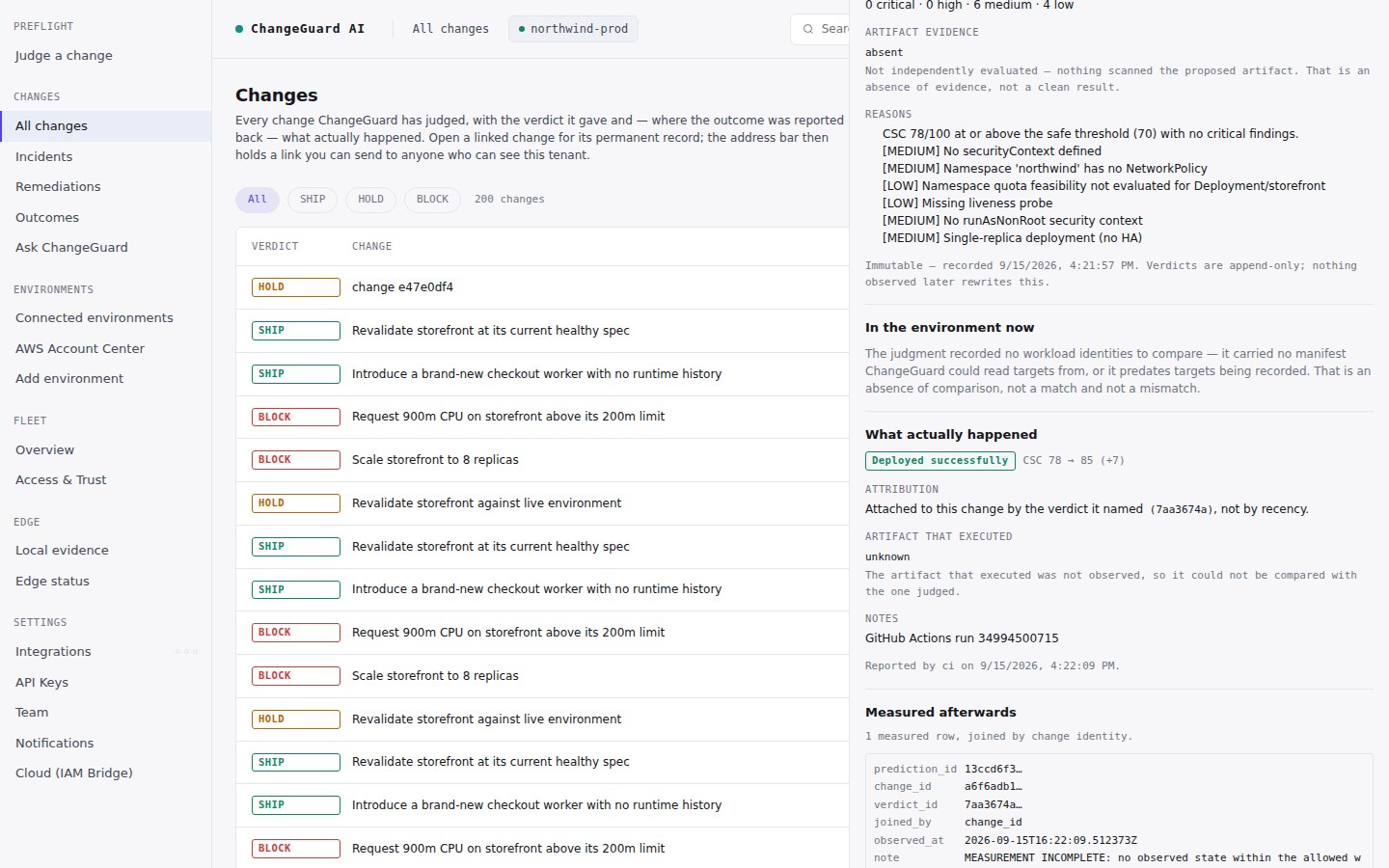
Change record — SHIP, then deployed successfully
A change record showing the judgment before execution (SHIP) and what actually happened afterwards: deployed successfully, attributed to this change by the verdict it named, not by recency.
4

When a deploy goes wrong — the incident lands on the change that caused it

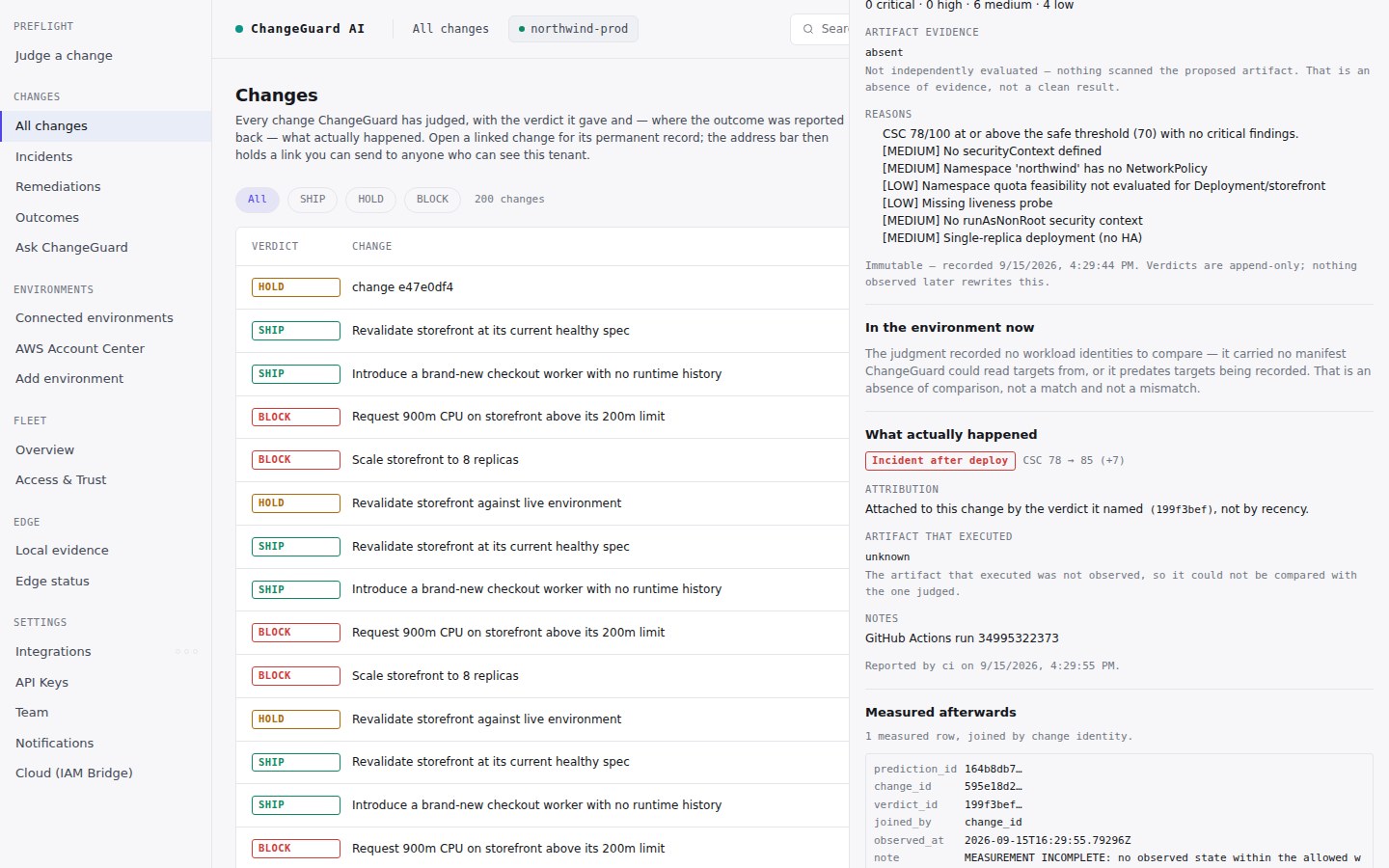
This change also shipped — and the deploy failed. The incident is recorded against exactly this change, so nobody reconstructs the connection by hand.

Change record — SHIP, then an incident after deploy
A change record showing verdict SHIP and, under what actually happened, an incident after deploy attributed to this change.
Change history

The judgment and the outcome are kept together, permanently.

Every change ChangeGuard AI has judged, with the verdict it gave and — where the outcome was reported back — what actually happened. Open any change for its permanent record; the address is a link you can send to a colleague.

All changes — the record
The Changes list: every judged change with its verdict — SHIP, HOLD or BLOCK — and a permanent link for each.
  • Verdicts are append-only. Nothing observed later rewrites what was decided before execution.
  • An outcome is attached to a change by the verdict it named — never by recency, never by guesswork.
  • A record with no reported outcome reads “not reported” — an absence of evidence, never a claim that the change was safe.
  • One change, one address. Share the record, not a screenshot.
Remediation

Advise or Auto — you set the authority, per environment.

When a change causes a problem, ChangeGuard AI proposes the fix. How far it may go is a decision you make for each environment, never account-wide — and the watching side stays read-only either way.

Advise default

ChangeGuard AI proposes the fix and waits. A person approves it — or rejects it — before anything is applied. Then the fix is applied and verified against real health, and the record keeps the approver’s name.

Auto opt-in

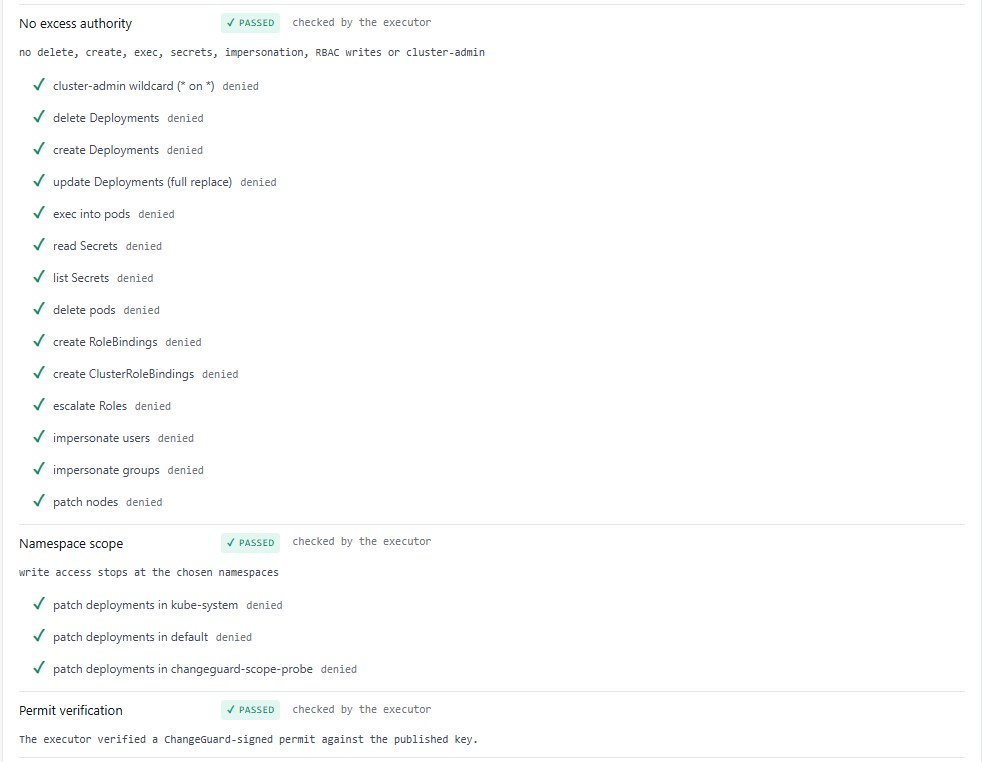
Within a policy you write — which namespaces, which kinds of fix, a confidence floor, an hourly cap — ChangeGuard AI applies the fix itself, then verifies it. Outside the policy, nothing executes.

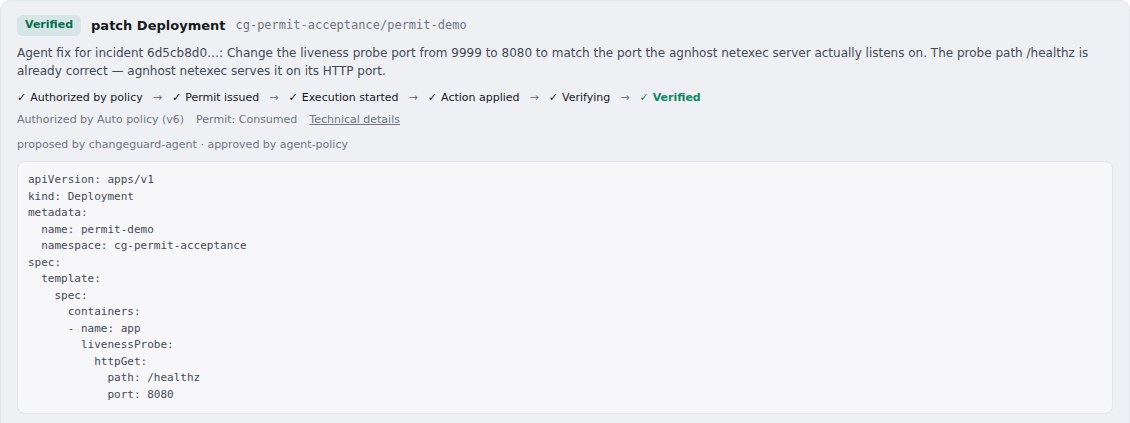
Remediations — a fix proposed, approved by a person, applied, verified
A verified remediation: a patch proposed by ChangeGuard AI, approved by a named person, showing the before and after of the fix.
Works with your delivery workflow

Nothing to rip out. Nothing to paste.

ChangeGuard AI sits beside the way you already ship. It judges; your pipeline still deploys.

GitHub pull requests

A verdict on every pull request, and the outcome after each deploy, joined back to it. The repository proves who it is with a short-lived identity token GitHub issues to the workflow — no API key to create, nothing to paste, no Settings page to visit. BLOCK fails the check; HOLD never does.

Any pipeline or agent

One call from Jenkins, GitLab, Argo, a script — or from a coding agent that asks before it ships. Same judgment, same record.

By hand

Preflight in the product: describe a change, name the environment, evaluate. Works with nothing connected, and gets sharper as you connect an environment.

Connecting an environment is read-only and takes minutes. How it works → · Start here in the docs →

See whether your next change should ship.

Watch the demo, or start free and judge a change in the next five minutes — no environment required to get your first verdict.